A customer asks ChatGPT what your bestseller costs, or how long your return window is, and gets an answer you never wrote. Until now you had no official way to correct it, and no way to see how often it happened.
That changed on 10 November 2026. OpenAI introduced Businesses in ChatGPT in beta, pitched as a new way to reach the 1.2 billion people who use ChatGPT each week. You can now claim your business, correct its details and see OpenAI's own mention and click counts.
Below: what actually launched, who qualifies for which part, what OpenAI won't show you, how it differs from the paid ChatGPT Business plan, and the one-hour check we'd do first. This is our reading of OpenAI's announcement, its help center and early hands-on guides, not results from our own clients.
What launched: a profile, product feeds, insights and agents
"Businesses in ChatGPT" is an umbrella name. Under it sit separate pieces with separate rules:
- Business Hub: claim and verify your business, then edit your website, description, category, logo, cover photo, and delivery and return policies.
- Product feeds: retailers can add prices and availability through Shopify, a CSV upload or a hosted feed URL that follows OpenAI's product feed specification. Eligible Shopify products are already in ChatGPT through Shopify Catalog.
- Insights: mentions, website clicks and discovery topics over the past 28 days.
- Business Agents: a separate, labeled chat on your ChatGPT profile that answers questions from your product and policy info. Only for eligible US e-commerce and online service businesses.
Per IT Brief, Business Hub is launching globally for eligible businesses wherever ChatGPT is available, while agents stay US-only. You don't need an Ads account or a ChatGPT Enterprise agreement to claim. On price, OpenAI's VP of Monetization, Benji Shomair, told Digiday the tools are free for now and didn't rule out a paid model later (via Gaurav Tiwari).
One naming trap: Business Agents face the public. They aren't the agents a team builds inside its own ChatGPT workspace.
How claiming works: two gates, not one
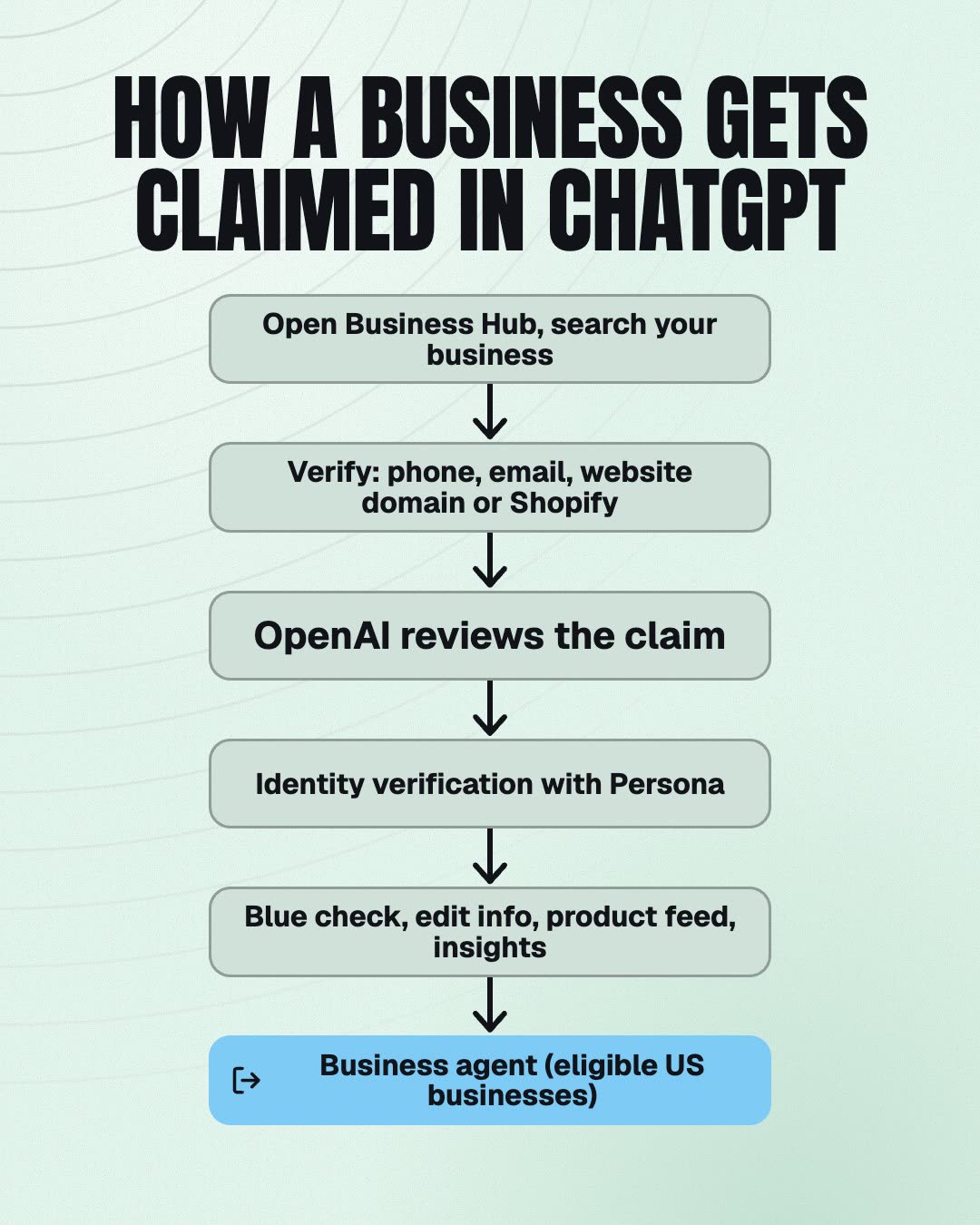
Gate one is the claim. Sign in, open Business Hub from the sidebar, search for your business by name and verify with one of the methods shown for your listing: a business phone (text or automated call), a business email, a DNS TXT record on your domain, or a Shopify login. OpenAI reviews the claim and emails its decision.
Gate two is Persona, a separate identity check. Until it's approved you can't publish changes, view insights, connect a product feed or create an agent. You may need a government-issued ID, business registration information and proof that you can represent the business. The blue check appears only after Persona approval, not after the claim.
Two practical tips. Use the legal name from your registration documents: OpenAI's example is a shop called River Street Coffee registered as River Street Foods LLC, which goes in the legal-name field. And if you verify by DNS, open your DNS panel before you request the record. Tiwari's record showed an expiry 30 minutes ahead.
Who can't claim yet: local stores and restaurants can claim only an existing US listing. Online businesses outside the US can apply. Tiwari created a draft profile for his agency from India, but approval there is still to be shown.
What the insights show, and what OpenAI won't share
Insights cover the past 28 days, as totals. Each number has a definition worth reading closely:
- Mentions: for an online business, a mention counts only when ChatGPT references your website. Your brand name alone doesn't count. For a local business, it counts when ChatGPT shows a result for that location.
- Website clicks: clicks through to your site. An OpenAI spokesperson told Digiday these don't confirm a completed visit or a purchase, so compare them with chatgpt.com referrals in your own analytics.
- Discovery topics: common themes in answers that mentioned or cited you. They aren't prompts and don't directly measure intent. We'd treat each topic as a content brief.
What you never get: individual prompts or conversations, including chats with your own Business Agent. Insights appear only above volume thresholds, so a blank metric doesn't necessarily mean zero. Share of voice, competitors and rankings aren't part of this beta either.
Why it still matters: as Barry Schwartz noted on Search Engine Land, Google and Microsoft don't offer click numbers in their own AI reporting tools. This is first-party data, and you can check any paid AI-visibility tracker against it.
Business Agents: who gets them and where they stop
To create an agent, both the claim and Persona must be approved, and your business must be an eligible US e-commerce or online service business that has a website and meets the Business Agents Policy. In the help center's words, a verified profile alone doesn't establish that you can create one.
When your business appears in an answer, people can open your profile and choose to chat with the agent. It answers product and policy questions from your feed, policies and instructions, then links to your website. The chat is labeled and kept separate from ChatGPT's own answers.
What it can't do: complete purchases, take bookings or check an order. So "where's my order?" still lands in your inbox.
- Test before publishing. OpenAI suggests asking a common question such as "Can I return an item I bought on sale?" and fixing the info if the answer is wrong.
- Publishing is optional. It's a separate step; customers can only chat with a published agent.
- The paid layer. You can sponsor your agent as the destination for ChatGPT Ads. Sponsored placements are labeled, and OpenAI says advertising doesn't influence ChatGPT's independent answers.
- Shopify shortcut. Connecting the store verifies the claim, shares products and can create a draft agent for you to review.
Not the same thing as the ChatGPT Business plan
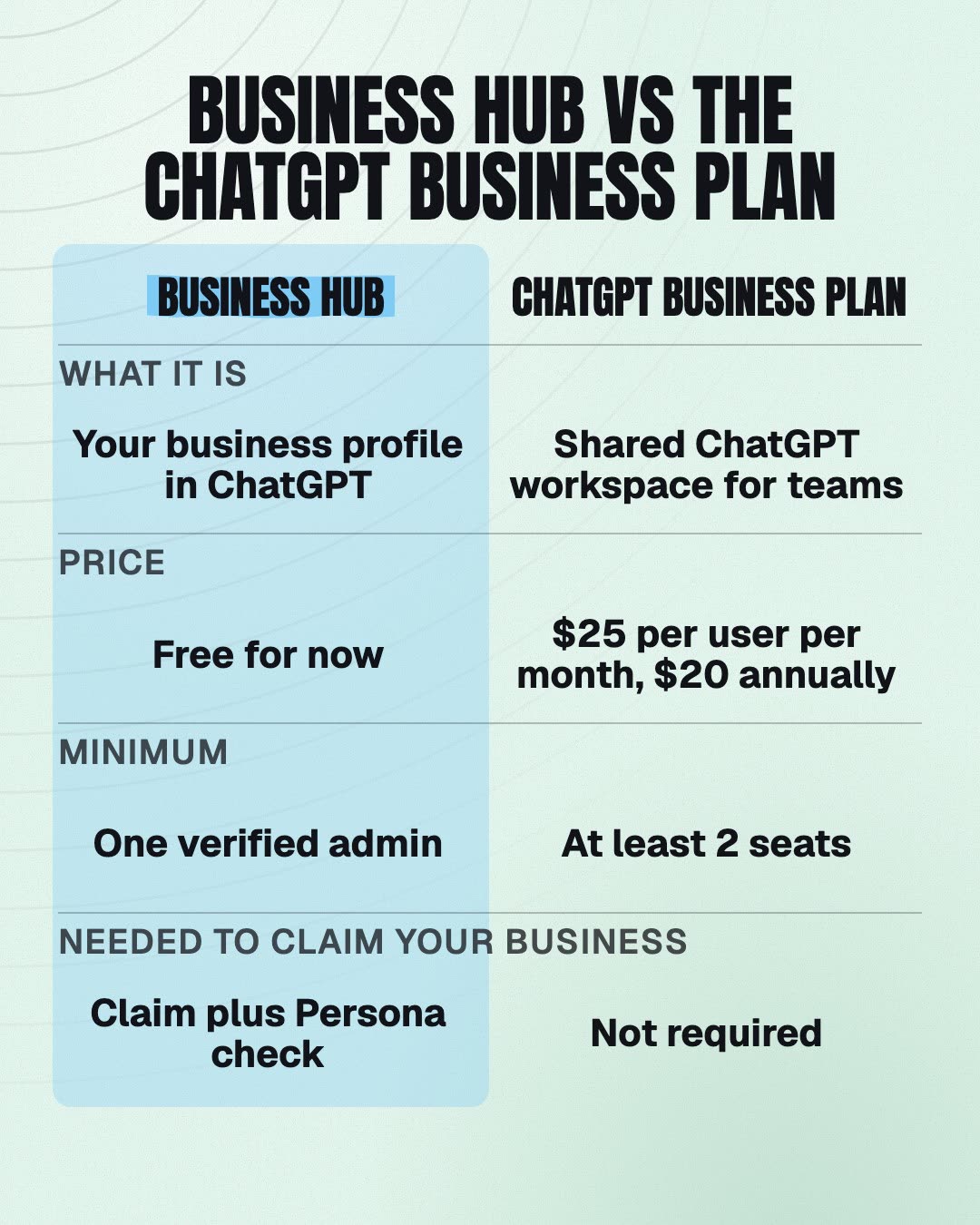
The names collide, so let's be clear. The ChatGPT Business plan is a paid team workspace: Standard seats cost $25 per user per month, or $20 billed annually, with a minimum of 2 seats.
Business Hub is a public profile of your company inside ChatGPT, free for now. You don't need the plan to claim. Tiwari's setup screen offered ad credit and the paid plan after he submitted his profile; neither is needed to continue.
Limits and open questions
No visibility boost. OpenAI's help center says claiming doesn't guarantee more visibility or give you direct control over ChatGPT's recommendations. Changes are reviewed before they publish, can take time to appear in answers, and ChatGPT may still use other sources.
Feeds lean US. Per Tiwari, the product feed specification currently targets the US, which limits retailers elsewhere.
Read the terms first. From Tiwari's reading (he notes it isn't legal advice):
- OpenAI can show a listing for your business whether or not you claim it, and may add to, edit or replace what you submit.
- The display license on basic details like name, address, hours and website is perpetual.
- Insight data is treated as OpenAI's confidential information, which limits sharing it, for example in a case study.
- Section 10 contains a broad promise not to bring claims against OpenAI, including about content on your own websites. Publishers should show it to a lawyer.
- Connecting a product feed means your text-and-data-mining opt-out doesn't apply to OpenAI.
Open questions: whether it stays free, when agents reach other countries and categories (OpenAI only says "over time"), and whether claimed data becomes ChatGPT's main source of business facts. It's a beta, so labels and eligibility may change. If you run several brands, note that each brand gets its own profile; there's no single parent profile.
Try this: the one-hour bestseller check
- First (15 min): before claiming, ask ChatGPT about your bestseller: its price, whether it's in stock, your return window, delivery cost and opening hours. Write down every wrong or missing answer. Tiwari recommends the same step.
- Next (15 min): open your bestseller's page. Are price, stock status and return policy stated plainly in text, and do they match your footer, Google Business Profile and checkout? Fix the page first, because ChatGPT still draws on other sources.
- Then (20 min): settle on one version of your delivery and return policy. It's what you'll paste into Business Hub, and an agent may repeat it to a buyer.
- Finally (10 min): read the terms, then start the claim, with the DNS method if you control your domain. Have your ID and registration documents ready for Persona.
Business Hub won't make ChatGPT like you more. What it gives you is a way to correct the facts and a first honest look at the clicks. Start with the hour of checking, not the claim form. For more practical guides on AI for small business, see /learn.